
Prazi GPS Modules:
Gii Pro and Gii V2.0 User Manual
Physical Layout
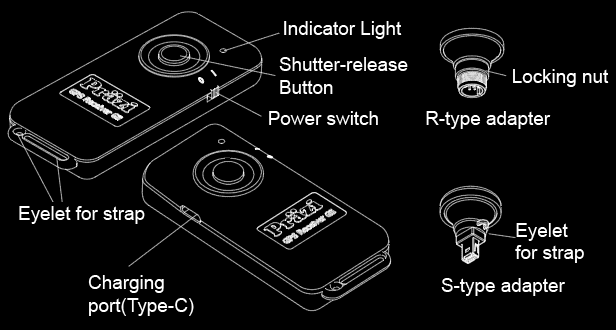
Gii-series GPS modules share the same basic layout: a shutter button on the front, a charging port on the left, a power switch on the right, and a lanyard hole at the end.
Optional adapters are available with either a round or rectangular connector.
2. Operating Modes
Both Gii V2.0 and Gii Pro support two operating modes: a direct Bluetooth connection to the camera, or a connection through a Bluetooth adapter.
1. Direct Bluetooth connection to the camera
This mode connects directly to the camera's built-in Bluetooth without additional accessories. Supported models: Z8, Z7 series, Z6 series, Z5 series, Z50 series, Z30, Zf, D6, D850, D780, D500, D7500, D5600, D3500, and D3400. Mainland China market versions are also supported.
Pair the module with the camera before using this mode. See How to Pair Gii Pro/V2.0 with Your Camera via Bluetooth. Pair one camera at a time, up to four cameras in total. Once four pairings are stored, a new pairing replaces the oldest one.
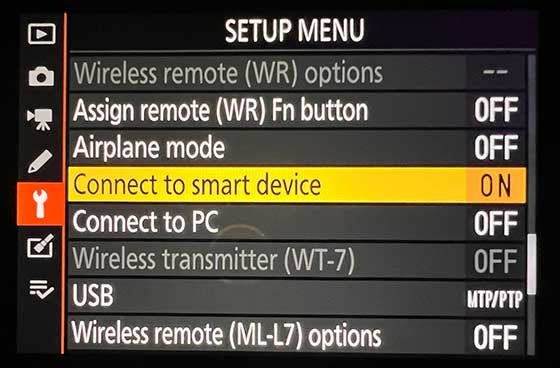
After pairing, leave the camera's "Connect to smart device" option set to "ON". Switching on the GPS module then connects it to the camera and sends location data. This mode does not support remote shutter release.
In this mode, Gii V2.0 can connect to only one camera at a time, while Gii Pro can connect to four cameras simultaneously.
2. Connection through an adapter
This mode requires a Bluetooth adapter attached to the camera. Adapters are available with either a round or rectangular connector.
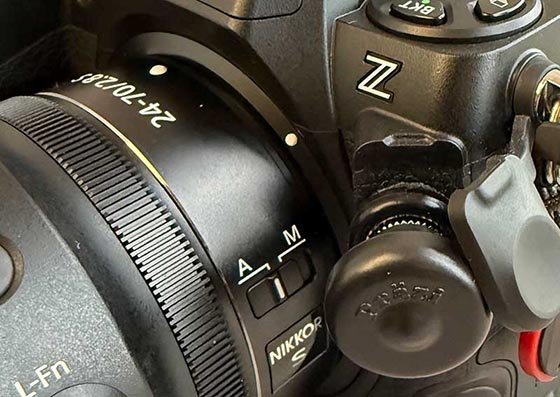
The round-connector adapter supports the Z9, Z8, D6, D5, D4 series, D3 series, D8xx series, D700, D300 series, and similar models. It can also be fitted to older D2-series cameras and the D200, but operation may be unstable.
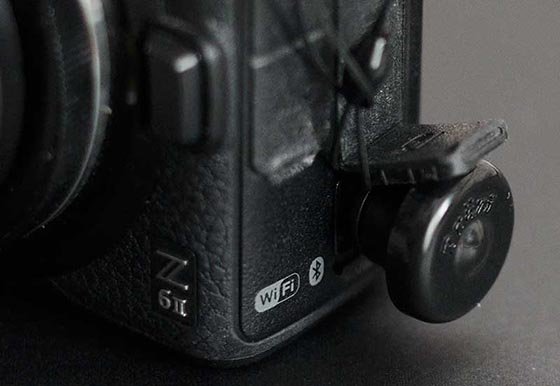
The rectangular-connector adapter supports the Z7 series, Z6 series, Z5 series, D7xxx series, D5xxx series, D3xxx series, Df, and similar models. It can also be fitted to the older D90, but operation may be unstable.
One GPS module can be paired with four adapters. Gii V2.0 can connect to only one adapter at a time, while Gii Pro can connect to four adapters simultaneously. Once paired, the adapters are ready to use simply by plugging them in.
This mode supports both sending GPS location data to the camera through the adapter and remote shutter release. However, mainland China market versions of Z-series cameras and D-series cameras released after 2015 require a firmware unlock before GPS data can be recorded in photos. Only a few models, such as the D800 and D700, work without this modification.
Understanding the Indicators
Startup Self-Test
- Green on
- →
- Red on
- →
- Green + red
- →
- Green + blue
- →
- Blue, green, then red flash briefly in sequence, once
Normal Operating Mode
Blue: Bluetooth status
| Indicator pattern | Meaning | Action |
|---|---|---|
| Steady flashing | Connected to an adapter or to the camera via Bluetooth | Operating normally |
| Brief flashes with longer pauses | Not connected, but an unpaired adapter is nearby | |
| Slow flashing | No connectable adapter or camera nearby | Plug in the adapter or switch on the camera |
Green: GPS status
| Indicator pattern | Meaning | Action |
|---|---|---|
| Brief flash | Searching for satellites; no position fix yet | Go outdoors to a location with a clear view of the sky and wait |
| Long flashes | Position fix acquired | Ready to take photos |
Red: periodic flash groups indicate battery level
Count the red flashes in each group to check the battery level. The animations repeat more frequently than the actual indicator for easier viewing.
| Indicator pattern | Meaning | Recommendation |
|---|---|---|
| 5 red flashes | Plenty of charge: at least 15 hours of continuous operation remaining | Continue using normally |
| 4 red flashes | Plenty of charge: at least 10 hours of continuous operation remaining | Continue using normally |
| 3 red flashes | About half the battery has been used; more than 5 hours of continuous operation remain | Continue using if staying nearby; charge before an extended outing |
| 2 red flashes | Battery running low | Charging recommended |
| 1 red flash | Battery very low | Charge soon |
| Solid red | Battery depleted | Charge immediately. |
| Note: while charging, the red indicator stays on ; when fully charged, the green indicator stays on . | ||
Combined Examples
The animations below repeat automatically. Off means neither blue nor green is lit. These examples show the connection and GPS status; red battery-level indications are described above.
| Indicator | Meaning |
|---|---|
| Not connected to an Adapter or to a camera via Bluetooth. GPS is still searching for satellites; no position fix has been acquired yet. | |
| Not connected to an Adapter or to a camera via Bluetooth. A GPS position fix has been acquired, but location data cannot be sent to a camera until a connection is established. | |
| Connected to an Adapter or to a camera via Bluetooth. GPS is still searching for satellites; no current position fix has been acquired yet. | |
| Connected to an Adapter or to a camera via Bluetooth. A GPS position fix has been acquired, and the module is ready to send current location data to the camera. |
Pairing Mode
Hold down the shutter button while switching on the module. After the self-test, the red indicator stays on. Release the button to enter pairing mode. There are two stages: pair adapters first, then cameras. After confirming a pairing in either stage, releasing the button advances to the next stage.
Stage 1: Find an adapter (first 15 seconds; blue indicator only)
| Indicator pattern | Meaning | Action |
|---|---|---|
| Slow flashing | No adapter available for pairing nearby | Wait 15 seconds to proceed to camera pairing |
| Steady flashing | An adapter is nearby, but it is already paired | No action needed. If it also moves out of range, the indicator returns to the pattern above |
| Rapid flashing | An unpaired adapter has been found; waiting for confirmation | Half-press the shutter button to start pairing with it |
After half-pressing the shutter button
| Indicator pattern | Meaning | Action |
|---|---|---|
| Solid green | Connected to the adapter and a focus command has been sent. Check which camera focuses to identify the selected camera. | To accept: press the shutter button all the way down To reject: release the button. The module skips this adapter and continues searching |
| Solid red | The full press has confirmed this adapter | Release the shutter button to proceed automatically to camera pairing |
Stage 2: Find a camera (up to 3 minutes; green indicator only, blue off)
| Indicator pattern | Meaning | Action |
|---|---|---|
| Slow flashing | No camera available for pairing nearby | Enable Bluetooth on the camera and wait for pairing |
| Steady flashing | A camera is nearby, but it is already paired | No action needed |
| Rapid flashing | A camera available for pairing has been found; connecting | Complete pairing with this camera on your phone |
Continuous rapid green flashing is normal; the module is not stuck. The remaining pairing steps take place on your phone. The module cannot see the result, so it does not indicate success or stop early. It keeps flashing until you switch it off and on again, or until the 3-minute period ends and it returns to normal operation. The camera record is saved as soon as the connection is established and is retained even if you switch off the module.
During pairing, the module does not display the battery level because the red indicator is reserved for pairing. GPS satellite acquisition continues in the background, so location data can be sent soon after pairing finishes.
Frequently Asked Questions
- All three indicators are off?
- Check the power first. During normal operation, the blue indicator keeps flashing, sometimes slowly with long pauses between flashes. If all three indicators remain off for a long time, the battery is usually too low to power on the module. Charge it promptly.
- The green indicator keeps flashing rapidly?
- This is normal during the second pairing stage while waiting for pairing to be completed on your phone. It continues until you switch the module off and on again, or until the 3-minute period ends.
- The green indicator stays on?
- While connected to a charger, solid green means the battery is fully charged.
- The red indicator stays on?
- When not charging, there are two possible causes: the battery voltage is below 3.34V (charge the module, then switch it off and on again), or you held the shutter button while switching on, but the battery was too low to enter pairing mode. In the latter case, release the button to enter normal operation.
- While connected to a charger, solid red means charging is in progress.
- How do I pair another device?
-
Gii Pro can store pairings for up to four adapters and four cameras, with all eight channels operating simultaneously. When the relevant pairing list is full, a new pairing replaces the oldest one.
Gii V2.0 can store pairings for up to four adapters and two cameras. When the relevant pairing list is full, a new pairing replaces the oldest one. It can connect to only one adapter and one camera at a time.
Appendix: Technical Specifications
Dimensions: 1 1/2 x 3 x 5/8 inch.
Weight: 1.6 Oz (main unit)
Battery capacity: 600 mAh;
charging time: approximately 3 hours
Continuous runtime on a full charge: Gii V2.0 > 24 hours; Gii Pro > 20 hours (depending on operating mode and the number of connected cameras)
Charging port: USB Type-C
Charging voltage: USB 5V
Operating temperature: 0 to +185 °F
Bluetooth working distence: 32ft with no obstructions
GNSS systems: GPS
GNSS sensitivity: cold start -148 dBm; hot start -155 dBm; tracking -165 dBm
GNSS update rate: 1 Hz
Coordinate system: WGS-84
Positioning accuracy:Approx.5 ft
Location data: longitude, latitude, altitude, UTC time
Cold start time: Fastest 24 seconds
Hot start time: 1 second
Maximum speed: 1000 mph
Maximum altitude: 59,000 ft